
Airtable
Airtable
Bring operational data and context into the flow of your ChatGPT conversations. You can ask questions, create and update records, and analyze your data—all through conversation. Use the data in Airtable as input to the work you’re doing in ChatGPT, like building a landing page using content you’ve organized in Airtable. Make quick updates to Airtable without leaving the chat. Airtable for ChatGPT is ideal anytime you need quick access to structured internal data to inform your conversation. Airtable's App connects ChatGPT directly to your Airtable bases, so you can ask questions, create and update records, and analyze your data—all through conversation
Snapshot
First seen
Dec 22, 2025
83
Score
Dashboard
A faster read on the listing: the score snapshot, the story the page is telling, and the strongest evidence we have right now.
Visibility score
83
Discovery Ready
Search footprint
40
Out of 40
Listing clarity
43
Out of 60
Evidence signals
7
Screenshots, prompts, and trust links
Listing narrative
What the listing says today
Best rank
1
Tagline
Bring operational data and context into the flow of your ChatGPT conversations. You can ask questions, create and update records, and analyze your data—all through conversation. Use the data in Airtable as input to the work you’re doing in ChatGPT, like building a landing page using content you’ve organized in Airtable. Make quick updates to Airtable without leaving the chat. Airtable for ChatGPT is ideal anytime you need quick access to structured internal data to inform your conversation. Airtable's App connects ChatGPT directly to your Airtable bases, so you can ask questions, create and update records, and analyze your data—all through conversation
Capabilities
Interactive, Writes
Description
Bring operational data and context into the flow of your ChatGPT conversations. You can ask questions, create and update records, and analyze your data—all through conversation. Use the data in Airtable as input to the work you’re doing in ChatGPT, like building a landing page using content you’ve organized in Airtable. Make quick updates to Airtable without leaving the chat. Airtable for ChatGPT is ideal anytime you need quick access to structured internal data to inform your conversation. Airtable's App connects ChatGPT directly to your Airtable bases, so you can ask questions, create and update records, and analyze your data—all through conversation
Snapshot notes
First seen Dec 22, 2025
18 tracked keyword intents and 17 category placements
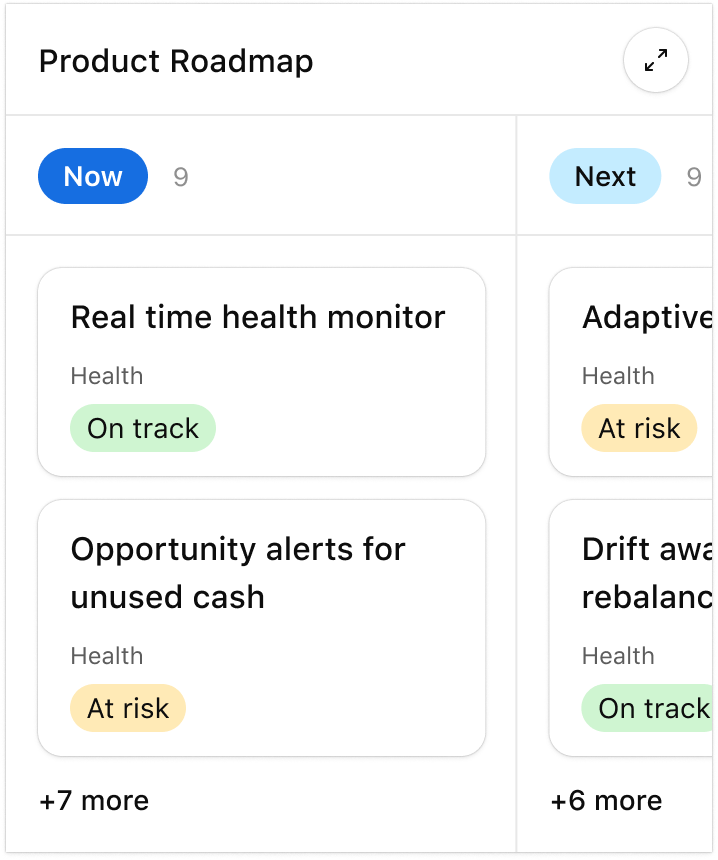
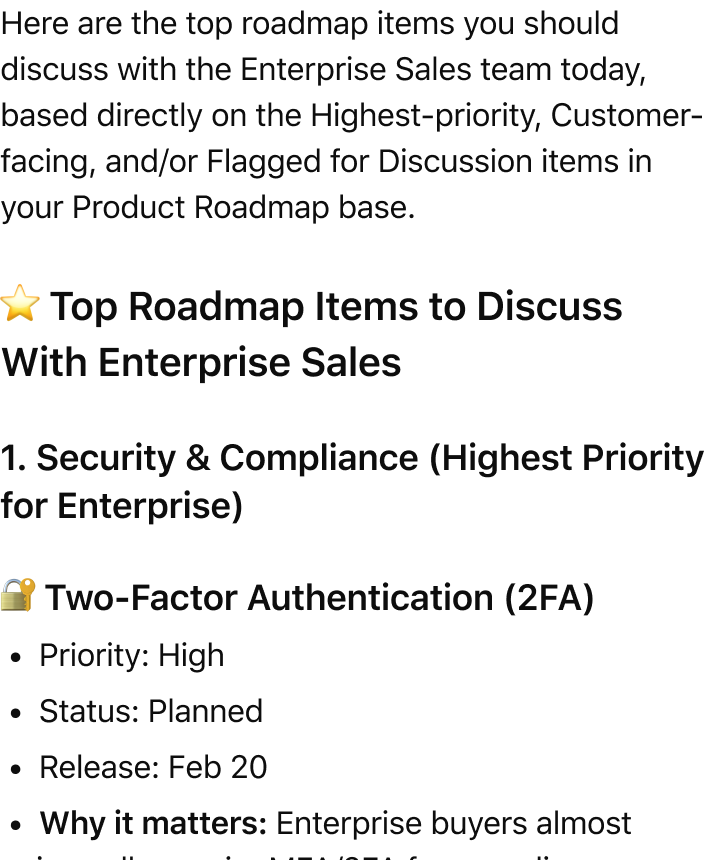
2 screenshots and 2 prompt examples captured
Immediate read
Very visible, credible, and easy to understand
Confidence: Medium — Description text looks collapsed or unavailable, so this factor is excluded from the weighted total. Tool coverage data is incomplete for this app, so tool depth is weighted lightly and excluded when unavailable.
Best current position is #1
Visual evidence
Screenshots and prompt examples
2 assets captured
Score breakdown
A simpler view of what is driving the score now and where the listing is still leaving the most value on the table.
Very visible, credible, and easy to understand
Built from search footprint out of 40 and listing clarity out of 60.
Confidence: Medium · Description text looks collapsed or unavailable, so this factor is excluded from the weighted total. Tool coverage data is incomplete for this app, so tool depth is weighted lightly and excluded when unavailable.
83
Score
Search footprint
40
Listing clarity
43
Best observed rank
1
Markets tracked
6
Top 10 placements
35
Trust links
3
Search footprint
Keyword breadth
18 tracked keyword intents rank today.
12/12
Strong
Average rank quality
How high the app tends to appear across keyword searches.
14/14
Strong
Best observed rank
Best current position is #1.
8/8
Strong
Category placements
17 category placements are helping discovery.
6/6
Strong
Listing clarity
Description quality
661 characters of description copy are available.
Description text looks collapsed or unavailable, so this factor is excluded from the weighted total.
0/18
Needs attention
Tagline specificity
Short, specific value propositions earn more credit than generic taglines.
4/4
Strong
Developer trust
Clear developer attribution is helping credibility.
4/4
Strong
Capability coverage
Declared capabilities help users understand the product surface faster.
6/6
Strong
Screenshots
2 screenshot assets are captured.
4/10
Needs attention
Prompt examples
2 prompt examples are visible.
6/8
Partial
External trust links
3 trust/doc links are helping validate the listing.
6/6
Strong
Tool depth
No tool inventory is currently captured.
Tool coverage data is incomplete for this app, so tool depth is weighted lightly and excluded when unavailable.
0/4
Needs attention
Actions
Priority-ranked changes that would make this listing easier to understand and more competitive in search.
Use screenshots to prove the workflow
2 visual assets are helping, but the listing can still do more visual storytelling. Add images that show concrete workflows and outcomes instead of only UI chrome.
Add more prompt-led examples
2 prompt examples are visible today. Add a few more examples that show different intents so users can instantly see how to use the app.
Additional recommendation
Expose more task-specific tools. Apps with richer tool menus tend to signal stronger utility.
Keyword data
Coverage first, then the full searchable ranking list in a compact table.
Top result (#1)
4
Ranks 2-3
26
Ranks 4-10
5
Keyword intents
18
Markets
6
Search summary
35 tracked placements are currently in the top 10
17 category placements are contributing to discovery
Best current position: #1
All tracked keywords and categories
Search the full set without extending the page.
AI
keyword · GB
Top result
#1
0
AI
keyword · BR
Top result
#1
0
AI
keyword · JP
Top result
#1
0
data
keyword · BR
Top result
#1
0
AI
keyword · US
Top 3
#2
0
AI
keyword · FR
Top 3
#2
0
AI
keyword · CA
Top 3
#2
0
data
keyword · GB
Top 3
#2
0
data
keyword · FR
Top 3
#2
0
data
keyword · JP
Top 3
#2
0
Featured
category · US
Top 3
#2
0
Featured
category · FR
Top 3
#2
0
Featured
category · GB
Top 3
#2
0
Featured
category · CA
Top 3
#2
0
Featured
category · JP
Top 3
#2
0
Featured
category · BR
Top 3
#2
0
Lifestyle
category · BR
Top 3
#2
0
Lifestyle
category · JP
Top 3
#2
0
Lifestyle
category · GB
Top 3
#2
0
Lifestyle
category · CA
Top 3
#2
0
Lifestyle
category · FR
Top 3
#2
0
productivity
keyword · JP
Top 3
#2
0
productivity
keyword · BR
Top 3
#2
0
productivity
keyword · GB
Top 3
#2
0
Productivity
category · BR
Top 3
#2
+4
data
keyword · US
Top 3
#3
0
data
keyword · CA
Top 3
#3
0
productivity
keyword · US
Top 3
#3
0
productivity
keyword · CA
Top 3
#3
0
productivity
keyword · FR
Top 3
#3
0
Productivity
category · JP
Top 10
#7
0
Productivity
category · CA
Top 10
#7
0
Productivity
category · FR
Top 10
#7
0
Productivity
category · GB
Top 10
#7
0
Productivity
category · US
Top 10
#7
0
History
A running view of how the listing has changed across tracked snapshots.
2.0.0
Apr 9, 2026, 6:22 AM
0 changes
2.0.0
Apr 8, 2026, 10:00 PM
3 changes
Tagline
Add structured data to ChatGPT Bring operational data and context into the flow of your ChatGPT conversations. You can ask questions, create and update records, and analyze your data—all through conversation. Use the data in Airtable as input to the work you’re doing in ChatGPT, like building a landing page using content you’ve organized in Airtable. Make quick updates to Airtable without leaving the chat. Airtable for ChatGPT is ideal anytime you need quick access to structured internal data to inform your conversation. Airtable's App connects ChatGPT directly to your Airtable bases, so you can ask questions, create and update records, and analyze your data—all through conversation
Description
Add structured data to ChatGPT Bring operational data and context into the flow of your ChatGPT conversations. You can ask questions, create and update
Version
1.0.0 2.0.0
1.0.0
Mar 26, 2026, 6:10 AM
0 changes
1.0.0
Mar 9, 2026, 12:05 PM
2 changes
Description
Bring operational data and context into the flow of your ChatGPT conversations. Use the data in Airtable as input to the Add structured data to ChatGPT
Images
4 2
1.0.0
Feb 25, 2026, 6:04 AM
0 changes
1.0.0
Feb 4, 2026, 5:54 AM
0 changes
1.0.0
Feb 3, 2026, 5:55 AM
0 changes
1.0.0
Feb 2, 2026, 2:30 PM
0 changes
1.0.0
Dec 22, 2025, 8:34 AM
1 changes
Initial discovery
First tracked version