
Coupler.io
Coupler.io
Analyze multi-channel marketing, financial, sales, e-commerce, and other business data within ChatGPT by connecting to your Coupler.io data flows. Fetch and transform raw data from platforms like Google Ads, Facebook, HubSpot, and Salesforce into actionable intelligence for smarter, faster decision-making with accurate, up-to-date business information. You can use the Coupler.io connector to: 1. Analyze customer acquisition costs: "What's our overall customer acquisition cost across all paid channels this quarter compared to last quarter? I need this for the board meeting" 2. Review marketing ROI: "Show me the ROI breakdown by marketing channel for the past 6 months. I need to reallocate our annual budget" 3. Identify high-performing campaigns:"Which campaigns are contributing most to our pipeline revenue? I want to double down on what's working" 4. Review sales pipeline: "Can you pull the sales pipeline report for this month? I need to see how many deals are in each stage and the total value at each stage" 5. Analyze conversion rates: "What are our conversion rates from lead to opportunity and from opportunity to closed-won for the last quarter? How do they compare to our targets?" 6. Forecast revenue: "How many deals are expected to close this month based on their probability scores? What's our forecasted revenue vs our monthly target?" 7. Compare quarterly profits: "Check the profit for this quarter, compare it to last quarter, and provide a breakdown by department" 8. Generate cash flow reports: "Could you provide a cash flow report for the last 30 days, including all incoming and outgoing transactions?" 9. Review accounts receivable: "Share the current accounts receivable status and tell me how many overdue invoices we have and which customers owe the most"
Snapshot
First seen
Dec 23, 2025
66
Score
Dashboard
A faster read on the listing: the score snapshot, the story the page is telling, and the strongest evidence we have right now.
Visibility score
66
Competitive
Search footprint
30
Out of 40
Listing clarity
36
Out of 60
Evidence signals
9
Screenshots, prompts, and trust links
Listing narrative
What the listing says today
Best rank
1
Tagline
Analyze multi-channel marketing, financial, sales, e-commerce, and other business data within ChatGPT by connecting to your Coupler.io data flows. Fetch and transform raw data from platforms like Google Ads, Facebook, HubSpot, and Salesforce into actionable intelligence for smarter, faster decision-making with accurate, up-to-date business information. You can use the Coupler.io connector to: 1. Analyze customer acquisition costs: "What's our overall customer acquisition cost across all paid channels this quarter compared to last quarter? I need this for the board meeting" 2. Review marketing ROI: "Show me the ROI breakdown by marketing channel for the past 6 months. I need to reallocate our annual budget" 3. Identify high-performing campaigns:"Which campaigns are contributing most to our pipeline revenue? I want to double down on what's working" 4. Review sales pipeline: "Can you pull the sales pipeline report for this month? I need to see how many deals are in each stage and the total value at each stage" 5. Analyze conversion rates: "What are our conversion rates from lead to opportunity and from opportunity to closed-won for the last quarter? How do they compare to our targets?" 6. Forecast revenue: "How many deals are expected to close this month based on their probability scores? What's our forecasted revenue vs our monthly target?" 7. Compare quarterly profits: "Check the profit for this quarter, compare it to last quarter, and provide a breakdown by department" 8. Generate cash flow reports: "Could you provide a cash flow report for the last 30 days, including all incoming and outgoing transactions?" 9. Review accounts receivable: "Share the current accounts receivable status and tell me how many overdue invoices we have and which customers owe the most"
Capabilities
None declared
Description
Analyze multi-channel marketing, financial, sales, e-commerce, and other business data within ChatGPT by connecting to your Coupler.io data flows. Fetch and transform raw data from platforms like Google Ads, Facebook, HubSpot, and Salesforce into actionable intelligence for smarter, faster decision-making with accurate, up-to-date business information. You can use the Coupler.io connector to: 1. Analyze customer acquisition costs: "What's our overall customer acquisition cost across all paid channels this quarter compared to last quarter? I need this for the board meeting" 2. Review marketing ROI: "Show me the ROI breakdown by marketing channel for the past 6 months. I need to reallocate our annual budget" 3. Identify high-performing campaigns:"Which campaigns are contributing most to our pipeline revenue? I want to double down on what's working" 4. Review sales pipeline: "Can you pull the sales pipeline report for this month? I need to see how many deals are in each stage and the total value at each stage" 5. Analyze conversion rates: "What are our conversion rates from lead to opportunity and from opportunity to closed-won for the last quarter? How do they compare to our targets?" 6. Forecast revenue: "How many deals are expected to close this month based on their probability scores? What's our forecasted revenue vs our monthly target?" 7. Compare quarterly profits: "Check the profit for this quarter, compare it to last quarter, and provide a breakdown by department" 8. Generate cash flow reports: "Could you provide a cash flow report for the last 30 days, including all incoming and outgoing transactions?" 9. Review accounts receivable: "Share the current accounts receivable status and tell me how many overdue invoices we have and which customers owe the most"
Snapshot notes
First seen Dec 23, 2025
23 tracked keyword intents and 0 category placements
3 screenshots and 3 prompt examples captured
Immediate read
Visible, but still leaving discoverability upside
Confidence: Medium — Description text looks collapsed or unavailable, so this factor is excluded from the weighted total. Tool coverage data is incomplete for this app, so tool depth is weighted lightly and excluded when unavailable.
Best current position is #1
Visual evidence
Screenshots and prompt examples
3 assets captured
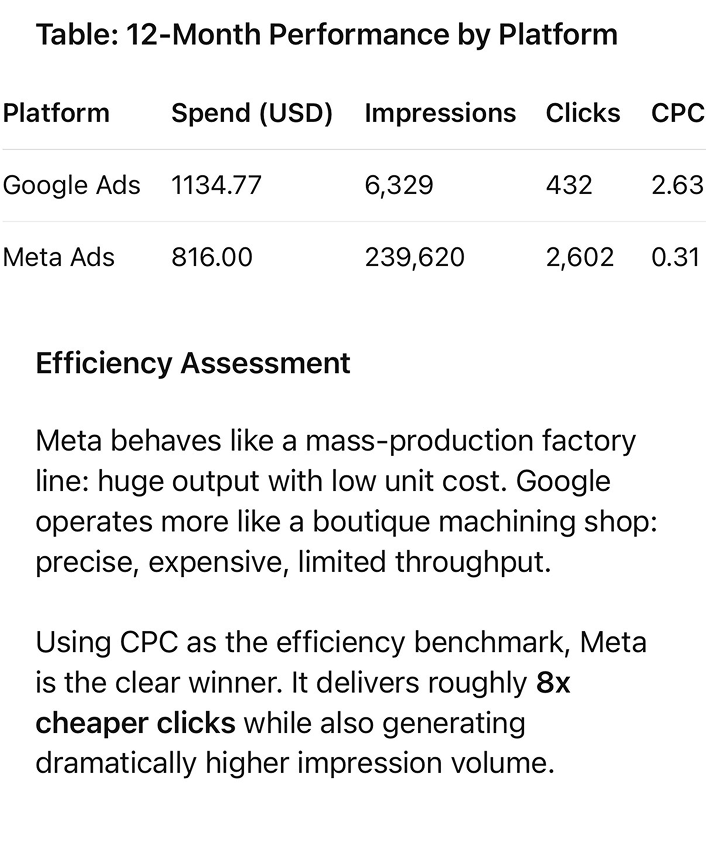
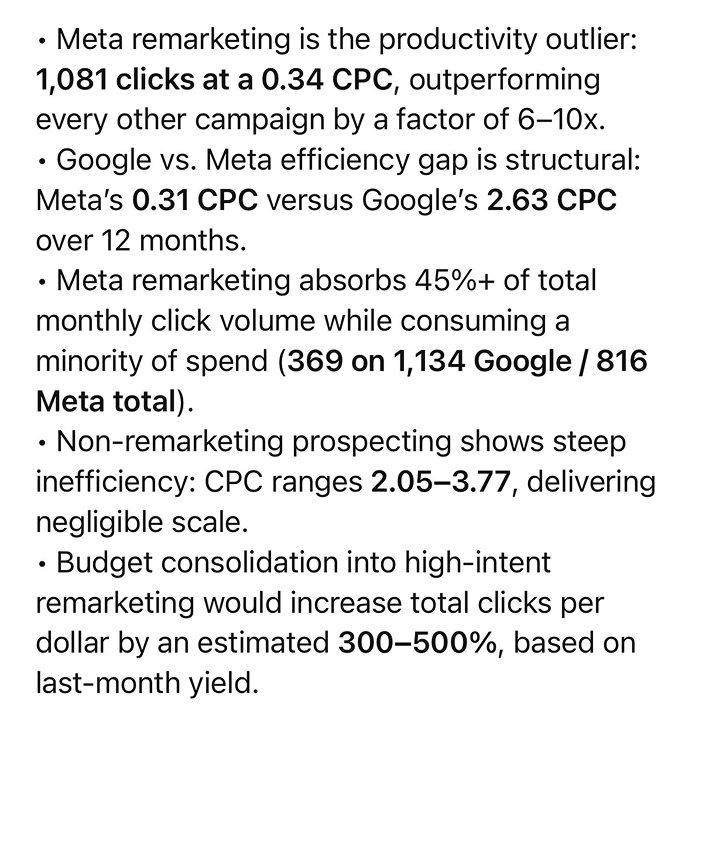
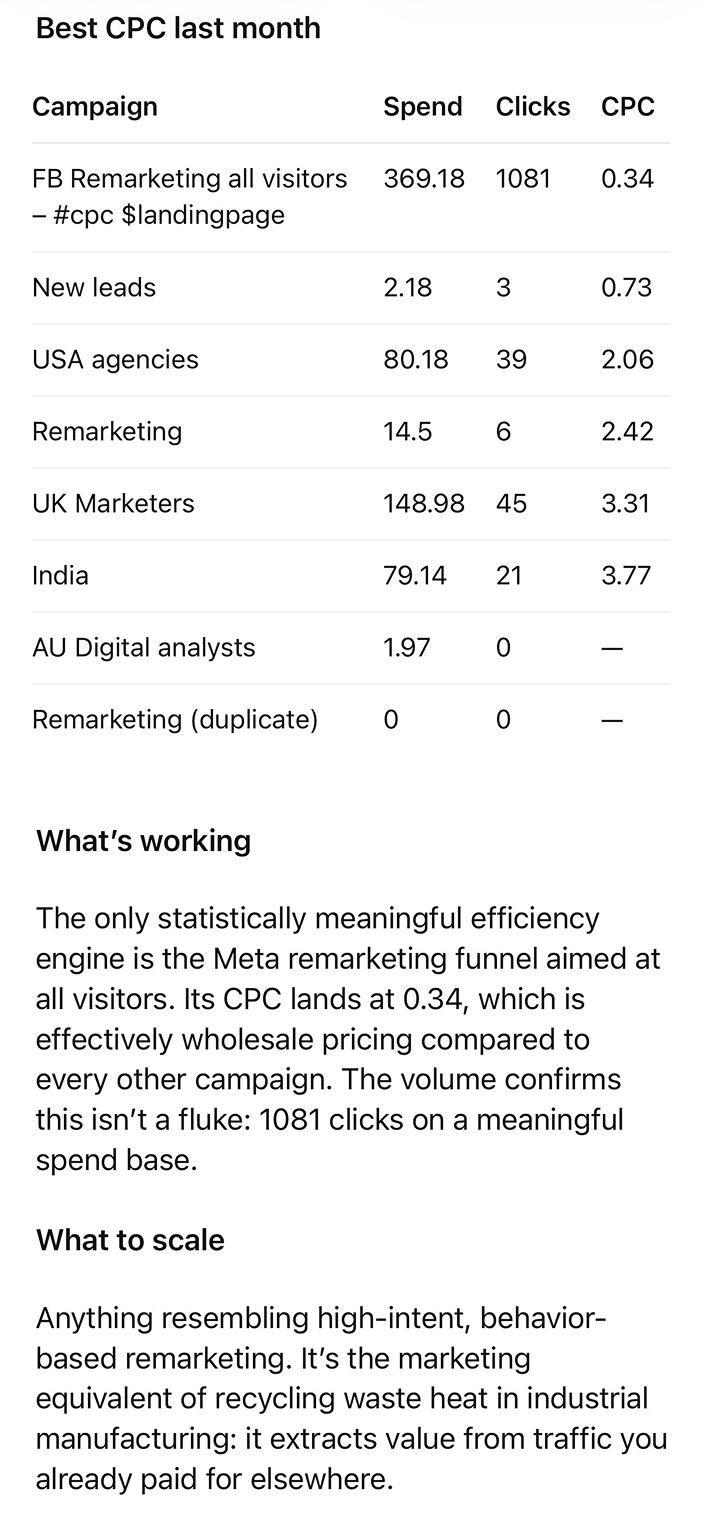
Score breakdown
A simpler view of what is driving the score now and where the listing is still leaving the most value on the table.
Visible, but still leaving discoverability upside
Built from search footprint out of 40 and listing clarity out of 60.
Confidence: Medium · Description text looks collapsed or unavailable, so this factor is excluded from the weighted total. Tool coverage data is incomplete for this app, so tool depth is weighted lightly and excluded when unavailable.
66
Score
Search footprint
30
Listing clarity
36
Best observed rank
1
Markets tracked
6
Top 10 placements
18
Trust links
3
Search footprint
Keyword breadth
23 tracked keyword intents rank today.
12/12
Strong
Average rank quality
How high the app tends to appear across keyword searches.
10/14
Partial
Best observed rank
Best current position is #1.
8/8
Strong
Category placements
No tracked category placements are helping yet.
0/6
Needs attention
Listing clarity
Description quality
1794 characters of description copy are available.
Description text looks collapsed or unavailable, so this factor is excluded from the weighted total.
0/18
Needs attention
Tagline specificity
Short, specific value propositions earn more credit than generic taglines.
4/4
Strong
Developer trust
Clear developer attribution is helping credibility.
2/4
Partial
Capability coverage
Capabilities are missing or too thinly described.
0/6
Needs attention
Screenshots
3 screenshot assets are captured.
7/10
Partial
Prompt examples
3 prompt examples are visible.
6/8
Partial
External trust links
3 trust/doc links are helping validate the listing.
6/6
Strong
Tool depth
No tool inventory is currently captured.
Tool coverage data is incomplete for this app, so tool depth is weighted lightly and excluded when unavailable.
0/4
Needs attention
Actions
Priority-ranked changes that would make this listing easier to understand and more competitive in search.
Improve category relevance
The app is not benefiting from category placements yet. Make the category use-case more explicit so it is easier to place and compare.
Clarify the product surface
Capabilities are missing. Add a concise set of concrete capabilities so the listing feels tangible instead of abstract.
Push more intents into the top results
You already have a best observed rank of #1, but overall rank quality still leaves room to improve. Strengthen the listing copy around core use-cases so more intents land in top positions.
Use screenshots to prove the workflow
3 visual assets are helping, but the listing can still do more visual storytelling. Add images that show concrete workflows and outcomes instead of only UI chrome.
Show who is behind the product
Developer identity is present, but it can still be reinforced with stronger trust signals and destination links.
Keyword data
Coverage first, then the full searchable ranking list in a compact table.
Top result (#1)
2
Ranks 2-3
10
Ranks 4-10
6
Keyword intents
23
Markets
6
Search summary
18 tracked placements are currently in the top 10
0 category placements are contributing to discovery
Best current position: #1
All tracked keywords and categories
Search the full set without extending the page.
analyze
keyword · BR
Top result
#1
0
apps
keyword · BR
Top result
#1
0
analyze
keyword · JP
Top 3
#2
0
analyze
keyword · GB
Top 3
#2
0
apps
keyword · GB
Top 3
#2
0
apps
keyword · JP
Top 3
#2
0
analyze
keyword · FR
Top 3
#3
0
analyze
keyword · CA
Top 3
#3
0
apps
keyword · US
Top 3
#3
0
apps
keyword · CA
Top 3
#3
0
apps
keyword · FR
Top 3
#3
0
data
keyword · BR
Top 3
#3
0
analyze
keyword · US
Top 10
#4
0
data
keyword · GB
Top 10
#4
0
data
keyword · JP
Top 10
#4
0
data
keyword · FR
Top 10
#5
0
data
keyword · CA
Top 10
#6
0
data
keyword · US
Top 10
#7
0
business
keyword · GB
#13
#13
0
business
keyword · JP
#13
#13
0
business
keyword · FR
#19
#19
0
business
keyword · CA
#19
#19
0
business
keyword · US
#20
#20
0
History
A running view of how the listing has changed across tracked snapshots.
1.0.0
Apr 9, 2026, 6:27 AM
0 changes
1.0.0
Apr 8, 2026, 10:07 PM
2 changes
Tagline
Analyze data from 400+ apps Analyze multi-channel marketing, financial, sales, e-commerce, and other business data within ChatGPT by connecting to your Coupler.io data flows. Fetch and transform raw data from platforms like Google Ads, Facebook, HubSpot, and Salesforce into actionable intelligence for smarter, faster decision-making with accurate, up-to-date business information. You can use the Coupler.io connector to: 1. Analyze customer acquisition costs: "What's our overall customer acquisition cost across all paid channels this quarter compared to last quarter? I need this for the board meeting" 2. Review marketing ROI: "Show me the ROI breakdown by marketing channel for the past 6 months. I need to reallocate our annual budget" 3. Identify high-performing campaigns:"Which campaigns are contributing most to our pipeline revenue? I want to double down on what's working" 4. Review sales pipeline: "Can you pull the sales pipeline report for this month? I need to see how many deals are in each stage and the total value at each stage" 5. Analyze conversion rates: "What are our conversion rates from lead to opportunity and from opportunity to closed-won for the last quarter? How do they compare to our targets?" 6. Forecast revenue: "How many deals are expected to close this month based on their probability scores? What's our forecasted revenue vs our monthly target?" 7. Compare quarterly profits: "Check the profit for this quarter, compare it to last quarter, and provide a breakdown by department" 8. Generate cash flow reports: "Could you provide a cash flow report for the last 30 days, including all incoming and outgoing transactions?" 9. Review accounts receivable: "Share the current accounts receivable status and tell me how many overdue invoices we have and which customers owe the most"
Description
Analyze data from 400+ apps Analyze multi-channel marketing, financial, sales, e-commerce, and other business data within ChatGPT by connecting to y
1.0.0
Mar 26, 2026, 6:52 AM
0 changes
1.0.0
Mar 9, 2026, 12:35 PM
2 changes
Description
Analyze multi-channel marketing, financial, sales, e-commerce, and other business data within ChatGPT by connecting to y Analyze data from 400+ apps
Images
6 3
1.0.0
Mar 6, 2026, 6:18 AM
1 changes
Description
Analyze multi-channel marketing, financial, sales, e-commerce, and other business data within ChatGPT by connecting to y Analyze multi-channel marketing, financial, sales, e-commerce, and other business data within ChatGPT by connecting to y
1.0.0
Feb 25, 2026, 6:34 AM
0 changes
1.0.0
Feb 4, 2026, 6:07 AM
0 changes
1.0.0
Jan 2, 2026, 5:52 AM
1 changes
Tagline
Unified business data access Analyze data from 400+ apps
1.0.0
Dec 23, 2025, 3:40 PM
1 changes
Initial discovery
First tracked version